
Websockets
Websockets allow to create a bidirectional connection between your clients and your server, allowing both sides to push content without the need of sending HTTP requests.
Flavors
There are three different flavors that you can use to host a web socket endpoint. They do not differ in functionality. In this section we will spawn a simple websocket server that will relay incoming messages to all other connected clients (so basically a simple chat application). In the “Client” section you will find a simple HTML file that can be opened in a browser to connect to your server.
Reactive
This flavor allows you to pass a handler instance that needs to implement IReactiveHandler
and will be notified when a client connects to your endpoint and starts to send messages. The connection provided
as a parameter in the handler functions allows you to send data to the connected client.
using GenHTTP.Engine.Internal;

using GenHTTP.Modules.Practices;
using GenHTTP.Modules.Websockets;

var websocket = Websocket.Reactive()
                         .Handler(new ChatHandler());

await Host.Create()
          .Handler(websocket)
          .Defaults()
          .Development()
          .RunAsync();

class ChatHandler : IReactiveHandler
{
    private static readonly List<IReactiveConnection> Clients = [];

    public ValueTask OnConnected(IReactiveConnection connection)
    {
        Clients.Add(connection);
        return ValueTask.CompletedTask;
    }

    public async ValueTask OnMessage(IReactiveConnection connection, IWebsocketFrame message)
    {
        var clientNumber = Clients.IndexOf(connection);

        foreach (var client in Clients)
        {
            await client.WritePayloadAsync($"[{clientNumber}]: " + await message.ReadPayloadAsync<string>());
        }
    }

    public ValueTask OnClose(IReactiveConnection connection, IWebsocketFrame message)
    {
        Clients.Remove(connection);
        return ValueTask.CompletedTask;
    }

}
Functional
The functional flavor is very similar to the reactive one, but instead of passing a handler, you can directly define the event handlers on the builder:
using GenHTTP.Engine.Internal;

using GenHTTP.Modules.Practices;
using GenHTTP.Modules.Websockets;

List<IReactiveConnection> clients = [];

var websocket = Websocket.Functional()
                         .OnConnected(c =>
                         {
                             clients.Add(c);
                             return ValueTask.CompletedTask;
                         })
                         .OnMessage(async (c, m) =>
                         {
                             var clientNumber = clients.IndexOf(c);

                             foreach (var client in clients)
                             {
                                 await client.WritePayloadAsync($"[{clientNumber}]: " + await m.ReadPayloadAsync<string>());
                             }
                         })
                         .OnClose((c, _) =>
                         {
                             clients.Remove(c);
                             return ValueTask.CompletedTask;
                         });

await Host.Create()
          .Handler(websocket)
          .Defaults()
          .Development()
          .RunAsync();
Imperative
While the functional and reactive flavor already dispatch incoming websocket frames to specific methods, the imperative mode requires you to provide the message loop yourself. This gives you more control over the connection, but requires a little bit more effort.
using GenHTTP.Engine.Internal;

using GenHTTP.Modules.Practices;
using GenHTTP.Modules.Websockets;
using GenHTTP.Modules.Websockets.Protocol;

var websocket = Websocket.Imperative()
                         .Handler(new ChatHandler());

await Host.Create()
          .Handler(websocket)
          .Defaults()
          .Development()
          .RunAsync();

class ChatHandler : IImperativeHandler
{
    private static readonly List<IImperativeConnection> Clients = [];

    public async ValueTask HandleAsync(IImperativeConnection connection)
    {
        Clients.Add(connection);

        var clientNumber = Clients.IndexOf(connection);

        do
        {
            var message = await connection.ReadFrameAsync();

            if (message.Type == FrameType.Ping)
            {
                await connection.PongAsync();
            }
            else if (message.Type == FrameType.Text)
            {
                foreach (var client in Clients)
                {
                    await client.WritePayloadAsync($"[{clientNumber}]: " + await message.ReadPayloadAsync<string>());
                }
            }
            else if (message.Type == FrameType.Close)
            {
                await connection.CloseAsync();
                break;
            }
        }
        while (connection.Request.Server.Running);

        Clients.Remove(connection);
    }

}
Client
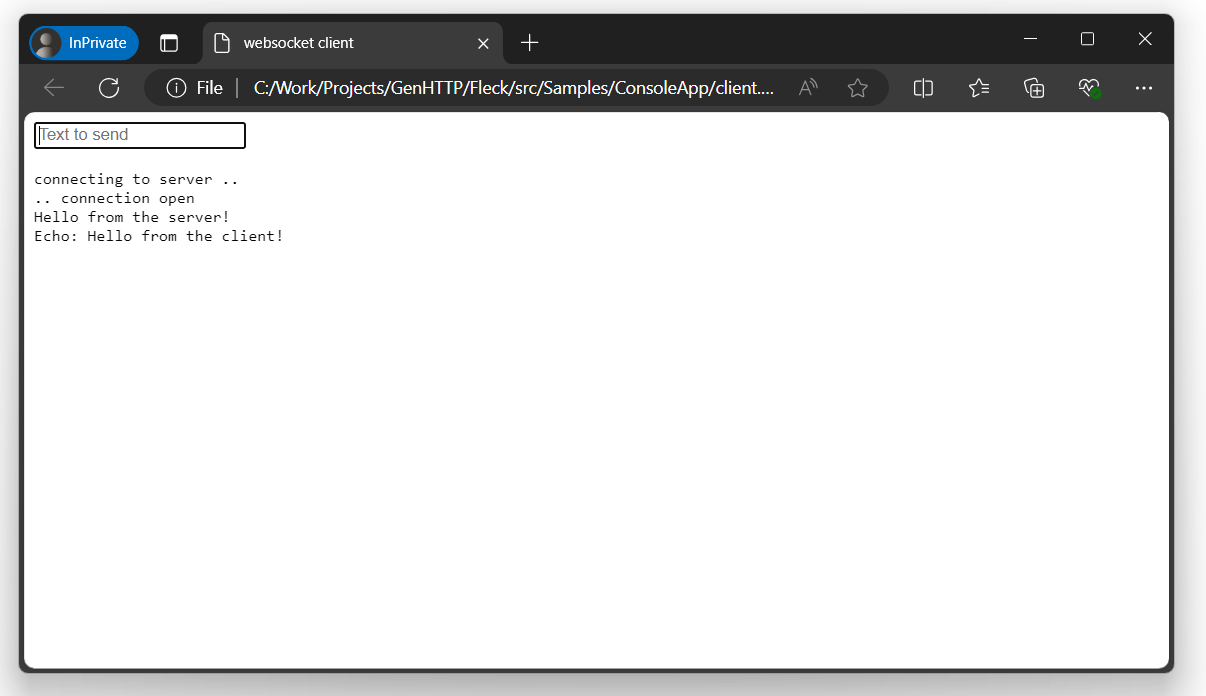
After starting the server, you can open the following HTML page in your browser to connect to the server:
<!DOCTYPE HTML PUBLIC "-//W3C//DTD HTML 4.0 Transitional//EN">
<html>
<head>
    <title>websocket client</title>
    <script type="text/javascript">
        var start = function () {
            var inc = document.getElementById('incoming');
            var wsImpl = window.WebSocket || window.MozWebSocket;
            var form = document.getElementById('sendForm');
            var input = document.getElementById('sendText');

            inc.innerHTML += "connecting to server ..<br/>";

            // create a new websocket and connect
            window.ws = new wsImpl('ws://localhost:8080/');

            // when data is coming from the server, this method is called
            ws.onmessage = function (evt) {
                inc.innerHTML += evt.data + '<br/>';
            };

            // when the connection is established, this method is called
            ws.onopen = function () {
                inc.innerHTML += '.. connection open<br/>';
            };

            // when the connection is closed, this method is called
            ws.onclose = function () {
                inc.innerHTML += '.. connection closed<br/>';
            }

			form.addEventListener('submit', function(e){
				e.preventDefault();
				var val = input.value;
				ws.send(val);
				input.value = "";
			});

        }
        window.onload = start;
    </script>
</head>
<body>
	<form id="sendForm">
		<input id="sendText" placeholder="Text to send" />
	</form>
    <pre id="incoming"></pre>
</body>
</html>
Every browser instance of this page will connect to the server and show messages entered in browser window.
Data Serialization
To send and receive objects via a websocket connection, the framework provides convenience methods that can be used:
var myObject = await message.ReadPayloadAsync<MyType>();

await connection.WritePayloadAsync(new MyType());
Those methods work both for primitives (e.g. int, string, Guid or enum) as well a complex
types, that will be deserialized from and serialized into a specified format (defaults to JSON).
If needed, you can customize the formatters and serializers used by your websocket handler:
using GenHTTP.Modules.Conversion;
using GenHTTP.Modules.Conversion.Formatters;
using GenHTTP.Modules.Conversion.Serializers.Yaml;
using GenHTTP.Modules.Websockets;

// read and write complex objects as YAML instead of JSON
var serialization = new YamlFormat();

// only support numeric types and GUIDs as primitives
var formatters = Formatting.Empty()
                           .Add(new FormattableFormatter())
                           .Build();

var websocket = Websocket.Reactive()
                         .Handler(new ChatHandler())
                         .Serialization(serialization)
                         .Formatters(formatters);
Please note that these types are the same that are used by the web service frameworks to read and write typed data, so you might want to share them to unify the behavior of your API.
Further Considerations
In contrast to regular webservice handlers, websockets can be used for long-running processes and to inform clients about events that happen in your systems. As this changes the typical request/response characteristic of a web server, there are things to be considered when implementing a websocket handler, which will be discussed in this section.
Long-running Tasks
In the default implementation of the reactive and functional handler, the server waits for the user code to be finished before processing the next incoming frame. This means that long-running jobs executed within your handler methods will block the message pump of the websocket, causing ping requests not to be answered, eventually causing the client to drop the connection to the server. Therefore, if you would like to execute a long-running task from a message handler, you should spawn a new task for it, so the handler can directly return to the message loop.
As creating new tasks introduces additional overhead and context switches, this behavior is not provided by the web server and needs to be manually implemented.
private Task? _importJob;

private readonly CancellationTokenSource _cancellationTokenSource = new();

public ValueTask OnMessage(IReactiveConnection connection, IWebsocketFrame message)
{
    _importJob = Task.Run(() => { /* ... */ }, _cancellationTokenSource.Token);
    return ValueTask.CompletedTask;
}

public ValueTask OnClose(IReactiveConnection connection, IWebsocketFrame message)
{
    _cancellationTokenSource.Cancel();
    return ValueTask.CompletedTask;
}
Synchronizing Write Access
Depending on your use case, you might want to write to the websocket connection from different threads as relevant events happen in your system. As the websocket connection is not thread safe, you need to synchronize write access manually, e.g. via an additional extension method:
using GenHTTP.Modules.Websockets;
using GenHTTP.Modules.Websockets.Protocol;

public static class WebsocketSynchronizationExtensions
{
    private static readonly SemaphoreSlim WriteLock = new(1, 1);

    public static async ValueTask WriteSynchronizedAsync<T>(this ISocketConnection connection, T payload, FrameType opcode = FrameType.Text, CancellationToken token = default)
    {
        await WriteLock.WaitAsync(token);

        try
        {
            await connection.WritePayloadAsync(payload, opcode, token);
        }
        finally
        {
            WriteLock.Release();
        }
    }

}
Note that WritePayloadAsync always flushes the frame it writes immediately - see
Frame Batching below if you want to buffer several writes and flush them together;
in that case, synchronize around WriteAsync/FlushAsync on ISocketConnection instead.
Frame Batching
WriteAsync, PingAsync, PongAsync and CloseAsync on ISocketConnection all accept a flush
parameter (defaulting to true). Passing flush: false buffers the frame instead of sending it
immediately; call FlushAsync() once you are done to send everything that has been buffered in one
go. This is useful if you are writing several frames in a row and want to avoid the overhead of a
separate network write per frame.
await connection.WriteAsync(firstPayload, flush: false, token: token);
await connection.WriteAsync(secondPayload, flush: false, token: token);

await connection.FlushAsync(token);
Continuation Handling
If a client sends a large chunk of data, browsers may segment this data
into multiple continuation messages. The websocket handler will collect those frames and
automatically merge them into a single IWebsocketFrame passed to your logic. A single frame may
carry at most 16 KB (BufferSize.Read) - larger frames are rejected with a PayloadTooLarge error,
so clients sending more data than that need to split it into continuation frames.
If you would like to handle continuation frames yourself, you can call
.HandleContinuationFramesManually() on the builder instances and will
start to receive frames with Type being set to Continue.
Allocation Handling
By default, the websocket handler will allocate a new buffer per frame to
keep the data available after the next message has already been read from
the underlying connection. This allows users to store frames or their Data.
For high performance scenarios, you can disable this automatic allocation
by calling .DoNotAllocateFrameData() on the builder and access the raw buffer
via frame.Raw.Memory (or frame.Raw.Segments for a message consisting
of multiple continuation frames). frame.Raw is typed IRawFrameData, a public contract you
can also implement or wrap yourself if you need to.