
Method Definitions
All API frameworks share a common base provided by the Reflection and Conversion modules which
define some of the capabilities that can be used when defining an API method
signature.
Injection
This section describes how parameters of your methods are initialized and which kind of types can be used.
Primitives
By default, a parameter type can be used within a method definition if it is either string,
bool, an enum, one of DateTime, DateTimeOffset, DateOnly, TimeOnly or TimeSpan, or
implements IUtf8SpanFormattable (which covers the numeric primitives such as int, long or
Guid).
Webservices
[ResourceMethod]
public int Length(string text) => text.Length;
Functional
.Get((string text) => text.Length)Controllers
public int Index(string text) => text.Length;Parameters can be declared nullable (e.g. int?) and will be initialized with null if not present.
If not declared nullable, parameters will be initialized with default(T) if not present.
By default, parameters are read from the request query (?text=abc).
If you would like to read the parameter directly from the request body, you can mark it with the [FromBody] attribute.
Webservices
[ResourceMethod(Method.Put)]
public int Length([FromBody] string text) => text.Length;
Functional
.Put(([FromBody] string text) => text.Length)Controllers
[ControllerAction(Method.Put)]
public int Index([FromBody] string text) => text.Length;
To read the parameter from the request path, use the appropriate method provided by the application framework.
Webservices
[ResourceMethod(Method.Delete, ":id")]
public void Delete(int id) { /* ... */ }
Functional
.Delete("/:id", (int id) => { /* ... */ })Controllers
[ControllerAction(Method.Delete)]
public void Delete([FromPath] int id) { /* ... */ }
Some frameworks allow to further restrict path parameters using a regular expression.
Webservices
[ResourceMethod("(?<ean13>[0-9]{12,13})")]
public Book? GetBook(long ean13) { /* ... */ }
Functional
.Get("/books/(?<ean13>[0-9]{12,13})", (long ean13) => { /* ... */ })Complex Types
When using a complex type in a parameter declaration, the value will be deserialized from the
request body. By default, handlers will accept content declared as XML, JSON, YAML or form encoded. If
the client does not declare the Content-Type, the server will try to treat the body as JSON.
Webservices
[ResourceMethod(Method.Post)]
public void Save(MyClass data) { /* ... */ }
Functional
.Post((MyClass data) => { /* ... */ })Controllers
[ControllerAction(Method.Post)]
public void Save(MyClass data) { /* ... */ }
HTML Forms
Form data can be used to populate both complex types and a generic dictionary-like object. Browsers
will encode the content as application/x-www-form-urlencoded and the framework will
populate the arguments as needed. This allows such endpoints to be used both from
browsers and as a regular API.
Example form:
    <form action="/save" method="post">
        <label for="id">ID:</label>
        <input type="number" id="id" name="id" required>
        <br><br>

        <label for="name">Name:</label>
        <input type="text" id="name" name="name" required>
        <br><br>

        <input type="submit" value="Submit">
    </form>
Can be read using the following definitions:
Webservices
[ResourceMethod(Method.Post)]
public void Save(BodyArguments bodyArgs) { /* ... */ }

// or

[ResourceMethod(Method.Post)]
public void Save(MyRecord record) { /* ... */ }
Functional
.Post("/save", (BodyArguments bodyArgs) => { /* ... */ })

// or

.Post("/save", (MyRecord data) => { /* ... */ })
Controllers
[ControllerAction(Method.Post)]
public void Save(BodyArguments bodyArgs) { /* ... */ }

// or

[ControllerAction(Method.Post)]
public void Save(MyRecord data) { /* ... */ }
Request Injection
To access information about the currently executed request you can add a parameter of
type IRequest to your method definition which will automatically be populated.
Webservices
[ResourceMethod]
public string? GetUserAgent(IRequest request) => request.Header.Headers.GetEntry("User-Agent");
Functional
.Get("/user-agent", (IRequest request) => request.Header.Headers.GetEntry("User-Agent"))Controllers
public string? UserAgent(IRequest request) => request.Header.Headers.GetEntry("User-Agent");Injecting requests is required if you would like to generate custom responses.
If you frequently access the request in your endpoints to achieve a certain functionality, think about adding custom primitives, custom injectors or a custom concern.
Handler Injection
Similar to request injection you can also inject the IHandler which is responsible for the
current request. This is typically not required but can be used to create and return
custom request handlers on the fly.
Streams
The request body can be injected as a Stream, e.g. when implementing
file uploads. This stream represents the processed request payload, so it
will already be decompressed and not in a chunked format. Depending on the
size of request body this will either be a stream backed by memory or by a file
and is therefore well suited for very large payloads.
Webservices
[ResourceMethod(Method.Put, "upload")]
public void Upload(Stream file) { /* ... */ }
Functional
.Put("/upload", (Stream file) => { /* ... */ })Controllers
[ControllerAction(Method.Put)]
public void Upload(Stream file) { /* ... */ }
Custom Injection
To inject custom types besides the built-in capabilities, you can configure
a custom InjectionRegistry and use it with your API services. The registry accepts
IParameterInjector instances that define what types are supported and how
the value is determined for a given request.
public interface IParameterInjector
{

    bool Supports(IServer server, Type type);

    ValueTask<object?> GetValueAsync(IHandler handler, IRequest request, Type targetType);

}
Supports is passed the server the service is running on and the type of the parameter, but not
the request - so its answer should only depend on the type and the server configuration. It is
evaluated when the service is prepared and again on every request, so keep it cheap.
The following injector will inspect the request headers for a correlation ID and create a new one if not present.
public record class CorrelationID(string ID);

public class CorrelationInjector : IParameterInjector
{

    public bool Supports(IServer server, Type type) => type == typeof(CorrelationID);

    public ValueTask<object?> GetValueAsync(IHandler handler, IRequest request, Type targetType)
    {
        var id = request.Header.Headers.GetEntry("X-Correlation-ID");

        return new(new CorrelationID(id ?? Guid.NewGuid().ToString()));
    }

}
The injector can then be added to the default injection registry:
Webservices
var injection = Injection.Default()
                         .Add(new CorrelationInjector());

var api = Layout.Create()
                .AddService<MyService>("service", injection);

public class MyService
{

    [ResourceMethod]
    public string GetCorrelationID(CorrelationID cor) => cor.ID;

}
Functional
var injection = Injection.Default()
                         .Add(new CorrelationInjector());

var api = Inline.Create()
                .Injectors(injection)
                .Get((CorrelationID cor) => cor.ID);
Controllers
var injection = Injection.Default()
                       .Add(new CorrelationInjector());

var api = Layout.Create()
                .AddController<MyController>("controller", injection);

public class MyController
{

    public string GetCorrelationID(CorrelationID cor) => cor.ID;

}
User Injection
To inject the authenticated user, you can add a typed injector to your injection registry.
var injection = Injection.Default()
                         .Add(new UserInjector<BasicAuthenticationUser>());
Instead of injecting the user, you can also use a built-in interceptor to achieve role-based authorization.
Response Generation
This section describes the various mechanisms to generate a service response.
Primitives
By default, a type can be used as a return type within a method definition under the same rules
as parameter primitives: string, bool, enum, the date/time types, or anything
implementing IUtf8SpanFormattable.
If declared nullable, the server will generate a HTTP 204 No Content if null is returned.
Webservices
[ResourceMethod]
public int Length(string text) => text.Length;
Functional
.Get((string text) => text.Length)Controllers
public int Index(string text) => text.Length;Complex Types
When returning a complex type, the value will be serialized and sent
to the client. The response format is negotiated with the client using the Accept request
header. By default, the server is capable of generating XML, JSON, YAML or form encoded responses. If
no format is specified by the client, the implementation will fall back to JSON.
If declared nullable, the server will generate a HTTP 204 No Content if null is returned.
Webservices
[ResourceMethod]
public MyType DoWork() => new();
Functional
.Get(() => new MyType())Controllers
public MyType Index() => new();Custom Responses
When injecting the request into your method, you can directly generate an IResponse
or IResponseBuilder and return it to the client. This allows you to take full control
over the response generation but is less readable than the typed versions.
Webservices
[ResourceMethod]
public IResponseBuilder Respond(IRequest request)
{
   var content = Resource.FromString("Hello World")
                         .Build();

   return request.Respond()
                 .Header("X-My-Header", "my-value")
                 .Content(content, ContentType.TextPlain);
}
Functional
.Get((IRequest request) => {
   var content = Resource.FromString("Hello World")
                         .Build();

   return request.Respond()
                 .Header("X-My-Header", "my-value")
                 .Content(content, ContentType.TextPlain);
})
Controllers
public IResponseBuilder Respond(IRequest request)
{
   var content = Resource.FromString("Hello World")
                         .Build();

   return request.Respond()
                 .Header("X-My-Header", "my-value")
                 .Content(content, ContentType.TextPlain);
}
For additional hints on how to use this method to provide responses, see the response content section.
Results
Results are type-safe responses that can still be adjusted to modify the generated HTTP response. Therefore, results can be considered an advanced way to generate responses without the need to fully generate the response in the first place.
Webservices
[ResourceMethod]
public Result<string> DoWork()
{
  return new Result<string>("Hello World").Header("X-My-Header", "my-value");
}
Functional
.Get(() => new Result<string>("Hello World").Header("X-My-Header", "my-value"))Controllers
public Result<string> Index()
{
  return new Result<string>("Hello World").Header("X-My-Header", "my-value");
}
The Result<T> class lets you adjust the response around the payload via Status(...),
Connection(...), Header(...) and Cookie(...) - the payload itself is still serialized the
same way it would be if you had returned it directly. This does not only work
for data structures, but also for special types such as streams.
Handlers
Instead of generating a response you can also return an IHandler or IHandlerBuilder instance.
This allows you to provide a whole segment on your web application by re-using the
existing handlers or by implementing custom ones.
The following example will render a fully navigable directory listing view depending on the tenant ID passed to the method:
Webservices
[ResourceMethod("files/:tenant")]
public IHandlerBuilder Files(int tenant)
{
  var tree = ResourceTree.FromDirectory($"/data/tenants/{tenant}");

  return Listing.From(tree);
}
Functional
.Get("/files/:tenant", (int tenant) => Listing.From(ResourceTree.FromDirectory($"/data/tenants/{tenant}")))Controllers
public IHandlerBuilder Files(int tenant)
{
  var tree = ResourceTree.FromDirectory($"/data/tenants/{tenant}");

  return Listing.From(tree);
}
Binary Data
To return files or similar content, you can directly return a Stream instance
from your method.
The framework will automatically seek and dispose the stream. Returning streams
is not thread-safe as streams are stateful, so you will need to create a new
instance for every request to be answered.
Besides streams, returning byte[] and ReadOnlyMemory<byte> is also supported.
Webservices
[ResourceMethod]
public Stream GetFile() => File.OpenRead("...");

[ResourceMethod]
public byte[] GetBytes() => Encoding.UTF8.GetBytes("Binary data");

[ResourceMethod]
public ReadOnlyMemory<byte> GetMemory() => "Binary data"u8;
Functional
.Get("/file", () => File.OpenRead("..."))
.Get("/bytes", () => Encoding.UTF8.GetBytes("Binary data"))
.Get("/memory", () => "Binary data"u8)
Controllers
public Stream Download() => File.OpenRead("...");

public byte[] Bytes() => Encoding.UTF8.GetBytes("Binary data");

public ReadOnlyMemory<byte> Memory() => "Binary data"u8;
Empty Responses
Methods with a void return type will automatically generate a HTTP 204 No Content
response. This is also the case when null is returned.
Webservices
[ResourceMethod]
public void DoWork() { }
Functional
.Get(() => { })Controllers
public void DoWork() { }Asynchronous Execution
Service methods returning a Task or ValueTask will be executed
asynchronously. All the features described in this document will work
for asynchronous execution as well.
Webservices
[ResourceMethod]
public async ValueTask<int> DoWork() { /* ... */ }
Functional
.Get(async () => await ...)Controllers
public async ValueTask<int> DoWork() { /* ... */ }Registries
This section describes registries that can be used for both injection as well as response generation.
Custom Primitives
Primitives (such as Guid or int) used in parameters or as a response type are automatically
handled using the built-in FormatterRegistry. You can add support for a custom type by
implementing an IFormatter and adding it to a custom registry which is then used by your
services:
public interface IFormatter
{

    bool CanHandle(Type type);

    object? Read(ByteString value, Type type);

    T Read<T>(ByteString value);

    string? Write(object value, Type type);

    IResponseContent GetContent<T>(T value);

}
Read(ByteString, Type) and Write are used wherever the value only needs to be parsed or
formatted as part of a larger operation (e.g. a path or query parameter). Read<T> and
GetContent<T> are used when the value is the whole response body, so GetContent<T> needs to
produce a full IResponseContent rather than just a string.
The following implementation will add support for a Point type with x and y coordinates
so it can be used in a service.
using GenHTTP.Modules.IO.Strings;

public record class Point(int X, int Y);

public class PointFormatter : IFormatter
{

    public bool CanHandle(Type type) => type == typeof(Point);

    public object Read(ByteString value, Type type)
    {
        var parts = value.ToString().Split('-');

        return new Point(int.Parse(parts[0]), int.Parse(parts[1]));
    }

    public T Read<T>(ByteString value) => (T)Read(value, typeof(T));

    public string? Write(object value, Type type)
    {
        var point = (Point)value;

        return $"{point.X}-{point.Y}";
    }

    public IResponseContent GetContent<T>(T value) => new StringContent(Write(value!, typeof(T))!);

}
This formatter can then be added to the default formatting registry.
Webservices
var registry = Formatting.Default()
                         .Add(new PointFormatter());

var api = Layout.Create()
                .AddService<MyService>("service", registry);

public class MyService
{

    [ResourceMethod("invert/:point")]
    public Point Invert(Point point) => new(point.Y, point.X);

}
Functional
var registry = Formatting.Default()
                         .Add(new PointFormatter());

var api = Inline.Create()
                .Formatters(registry)
                .Get("/invert/:point", (Point point) => new Point(point.Y, point.X));
Controllers
var registry = Formatting.Default()
                       .Add(new PointFormatter());

var api = Layout.Create()
                .AddController<MyController>("controller", registry);

public class MyController
{

    public Point Invert([FromPath] Point point) => new(point.Y, point.X);

}
The serialization format is implemented by the formatter, so the API can be called
via /invert/8-10 and will return 10-8 as a text formatted response.
Serialization Formats
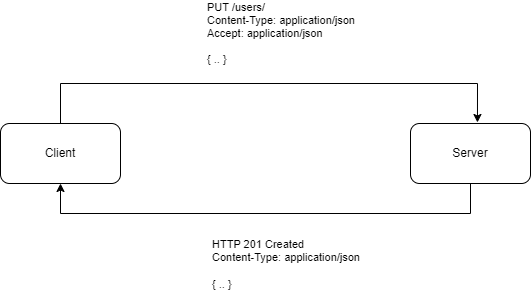
Serialization allows to read and write complex types, so they can be used in your method definitions. By default, services can consume and produce entities in XML, JSON, YAML or in form encoding, with a default fallback to JSON.
When sending an entity to your service, the client should specify the Content-Type
of the body so the server can choose the correct deserializer to read the data with. The Accept
header sent by the client tells the server which serialization format is preferred by
the client when a response is generated. The server will tell the client which
serialization format was used to generate the body of the response by specifying the
Content-Type header again.
To add support for an additional format you can implement the ISerializationFormat and
add your implementation to a registry which is then passed to your service, via .Add(contentType, format).
For example, the nuget package GenHTTP.Modules.Protobuf adds support for
Protocol Buffers (ContentType.ApplicationProtobuf) which is not
enabled by default. It adds an AddProtobuf() extension to the registry builder, so you
don’t need to register the format manually.
Webservices
var registry = Serialization.Default()
                            .AddProtobuf();

var api = Layout.Create()
                .AddService<MyService>("service", registry);

public class MyService
{

    [ResourceMethod(Method.Put)]
    public ResponseType Store(RequestType data) { /* ... */ }

}
Functional
var registry = Serialization.Default()
                            .AddProtobuf();

var api = Inline.Create()
                .Serializers(registry)
                .Put((RequestType data) => { /* ... */ });
Controllers
var registry = Serialization.Default()
                            .AddProtobuf();

var api = Layout.Create()
                .AddController<MyController>("controller", registry);

public class MyController
{

    [ControllerAction(Method.Put)]
    public ResponseType Store(RequestType data) { /* ... */ }

}
To configure the default serialization formats, you can pass configuration options directly to the
Default() factory:
var options = new JsonSerializerOptions()
{
    WriteIndented = false
};

var serialization = Serialization.Default(jsonOptions: options);
Interceptors
With interceptors, you can add behavior on operation-level by using additional attributes. This is useful for features such as authorization.
Webservices
using System.Net;

using GenHTTP.Api.Content;
using GenHTTP.Api.Protocol;

using GenHTTP.Engine.Internal;

using GenHTTP.Modules.Layouting;
using GenHTTP.Modules.Reflection;
using GenHTTP.Modules.Reflection.Operations;
using GenHTTP.Modules.Webservices;

var app = Layout.Create().AddService<MyService>("service");

await Host.Create()
          .Handler(app)
          .RunAsync();

class RequireLocalhostAttribute : InterceptWithAttribute<LocalhostInterceptor>;

class LocalhostInterceptor : IOperationInterceptor
{

    public void Configure(object attribute)
    {
        if (attribute is RequireLocalhostAttribute)
        {
            // ...
        }
    }

    public ValueTask<InterceptionResult?> InterceptAsync(IRequest request, Operation operation, IReadOnlyDictionary<ByteString, object?> arguments)
    {
        if (!request.Client.Address.Equals(IPAddress.Loopback))
        {
            throw new ProviderException(ResponseStatus.Forbidden, "Access from localhost only!");
        }

        return default;
    }

}

class MyService
{

    [ResourceMethod]
    [RequireLocalhost]
    public string MyMethod() => "Hello to localhost";

}
Functional
using System.Net;

using GenHTTP.Api.Content;
using GenHTTP.Api.Protocol;

using GenHTTP.Engine.Internal;

using GenHTTP.Modules.Functional;
using GenHTTP.Modules.Reflection;
using GenHTTP.Modules.Reflection.Operations;

var app = Inline.Create().Get([RequireLocalhost]() => "Hello to localhost!");

await Host.Create()
          .Handler(app)
          .RunAsync();

class RequireLocalhostAttribute : InterceptWithAttribute<LocalhostInterceptor>;

class LocalhostInterceptor : IOperationInterceptor
{

    public void Configure(object attribute)
    {
        if (attribute is RequireLocalhostAttribute)
        {
            // ...
        }
    }

    public ValueTask<InterceptionResult?> InterceptAsync(IRequest request, Operation operation, IReadOnlyDictionary<ByteString, object?> arguments)
    {
        if (!request.Client.Address.Equals(IPAddress.Loopback))
        {
            throw new ProviderException(ResponseStatus.Forbidden, "Access from localhost only!");
        }

        return default;
    }

}
Controllers
using System.Net;

using GenHTTP.Api.Content;
using GenHTTP.Api.Protocol;

using GenHTTP.Engine.Internal;

using GenHTTP.Modules.Controllers;
using GenHTTP.Modules.Layouting;
using GenHTTP.Modules.Reflection;
using GenHTTP.Modules.Reflection.Operations;

var app = Layout.Create().AddController<MyController>("controller");

await Host.Create()
          .Handler(app)
          .RunAsync();

class RequireLocalhostAttribute : InterceptWithAttribute<LocalhostInterceptor>;

class LocalhostInterceptor : IOperationInterceptor
{

    public void Configure(object attribute)
    {
        if (attribute is RequireLocalhostAttribute)
        {
            // ...
        }
    }

    public ValueTask<InterceptionResult?> InterceptAsync(IRequest request, Operation operation, IReadOnlyDictionary<ByteString, object?> arguments)
    {
        if (!request.Client.Address.Equals(IPAddress.Loopback))
        {
            throw new ProviderException(ResponseStatus.Forbidden, "Access from localhost only!");
        }

        return default;
    }

}

class MyController
{

    [ControllerAction(Method.Get)]
    [RequireLocalhost]
    public string MyMethod() => "Hello to localhost";

}